Huawei Health App Query

Brianrh

Member
I recently acquired a Honor Magic Watch 2, which is my first proper smartwatch. I am generally pleased with the watch and the Huawei Health app logs my steps aand heart rate which is all I really need. However The watch faces on the phone aren't exactly what I want and it seems these days after updates of the HH app, the tab which used to allow you to load new watch faces has been removed, from what I have been able to read online.

I was wondering if anyone else has come across this and if there is any other way of loading new watch faces on this watch? I don't want to root this watch even if it is possible to do so on this watch, just some straight foward method. Is it still possible to get an old version of the HH app and would it still allow this to be done?

Thanks.
 

WatchSmarty

Member
Staff member
Seems like Honor disables this for some regions. Try the following steps to resolve:

Step 1: Create a HUAWEI ID on cloud.huawei.com. Make sure to select your region as UK.
Step 2: Download HUAWEI health app but do not open it.
Step 3: Download HUAWEI mobile services application
Step 4: Turn on airplane mode, connect to wifi or mobile network and open the HUAWEI health app. Select the region as UK or India.
Step 5: Complete the pairing with your smart watch. You will be able to see option to use custom watch faces.
Step 6: You will not be able to download the custom watch faces yet. It will prompt you to login using HUAWEI ID.
Step 7: Goto settings > accounts > add new account and login using your created HUAWEI id.
 

Brianrh

Member
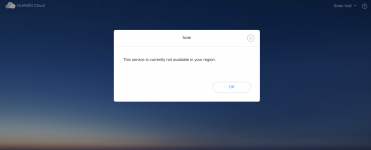
Tried this but unfortuneately it didn't work for me. I think the problem started at step when I got this when I tried to login to my Huawei Cloud account:

Screenshot 2021-02-20 at 13.46.20.png
 

WatchSmarty

Member
Staff member
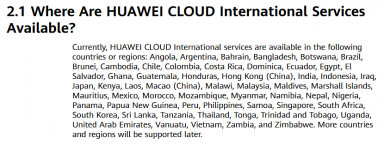
Would start fresh with a new ID and set to India. With the latest version of the app, looks like they made custom watchfaces dependent on this HUAWEI Cloud ID but it is only available in the countries below.

1613833676851.png
 

Brianrh

Member
I've created a new account but not how I wanted. You have to set your country of origin on the creation page and I set India but it was smart enough to realise that my location was different to where I stated it was. I set UK and it was happy and I was hoping that once inside the account, I would be able to change my location but it's only language you can change. However I can actually get into this account so perhaps I will repeat the procedure above and see if it works now.
 
Top